Small Countdown Clock for Windows
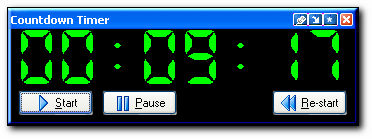
This useful utility allows you to count down time with an alarm. It's great when needing a countdown timer to be reminded of a specific event such as checking the roast cooking in the oven, checking the water level when filling your hot tub, or what ever else you can concoct. Supports up to 720 hours in the countdown. With Countdown Clock you can:
This software is absolutely great for churches or places needing to countdown until the service starts. Note: If you need to countdown multiple events (up to 100 events!) such as anniversary dates, birthdates and don't need an alarm feature, check out our other product called Countdown!. Version 3.3 works great in Windows Vista, XP, as well as 95/98/ME.
Instructions for passing command line arguments Attention programmers! Countdown Clock can be called from another program with up to 6 command-line arguments as shown below. The initial screen will be bypassed and the countdown will start immediately. countdown HH MM SS Y "Media file" "File To Run" The first three arguments - HH, MM and SS signify the number of hours, minutes and seconds to start the countdown. The 4th argument should be a capital Y or capital N signifying the exit style. If the 4th argument is Y then Countdown will exit without displaying the final exit message or playing the media file. The 5th argument signifies the media file to play when the count gets to 00:00. The media file will only be played if the 4th argument is set to N. The 6th argument represents an optional file that will be launched when the count gets to 00:00. Note if you don't have a media file but want to launch the optional file you can put in NULL for the 5th argument. Some examples:
| ||||||||||||||||||||||||||||||
Contact Management Software Products Task Plus Overview - Introduction Task Plus Overview - Date Oriented Tasks Task Plus Overview - Todos Task Plus Overview - Filters Task Plus Overview - Web Pages and Reports Task Plus Overview - Exporting and Archive Task Plus Overview - Customization News Contact Information Privacy | ||||||||||||||||||||||||||||||